Forma3D Review: A Mesh Editor That Actually Gets 3D Printing | TOP 3D MODELER
Forma3D keeps showing up in 'STL editor for iPad' searches, so we ran it through the jobs it claims to do — repair, split, scan, multi-color export — plus a few it doesn't.
What it is
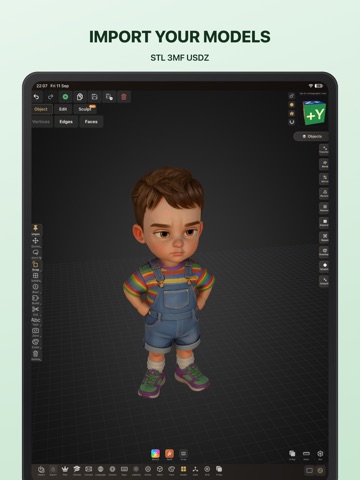
Forma3D is a mesh editor for iPhone and iPad aimed squarely at the 3D-printing crowd: import STL/3MF/USDZ, edit at vertex/edge/face level in a real Edit Mode, and export printer-ready files — including 3MF with embedded Bambu/Creality print profiles and per-face colors for AMS multi-material. Everything runs on-device; there's no cloud service in the middle.
What impressed us
- True Edit Mode on mobile. Vertex/edge/face manipulation with extrude, inset and bridge faces — the stuff that's been desktop-only on STL files. Repairing a downloaded model's broken face on a phone feels almost unfair.
- Print-native thinking. Split for the build plate, procedural M3–M20 bolts, image-to-3D conversion, and 3MF exports that carry printer/filament/layer metadata — features clearly built by someone who prints.
- Multi-color done right. Face Paint assigns filament per face; Bambu Studio and Creality Print read the exported 3MF as a multi-color model automatically. No slicer re-painting needed.
- Offline everything. No account, no upload queue, no cloud processing. On a train, it still works.
- Fair pricing. Free download with real viewing/inspection, then $6.99/mo, $49.99/yr — or a $99.99 lifetime option that subscription-fatigued users will appreciate. On the App Store.
Where it hits limits
- It's a workshop, not a canvas. No sculpting brushes, no parametric sketches — creating from imagination is Nomad/Shapr3D territory. Forma3D assumes a mesh exists.
- Young product. Small community, few tutorials, and the App Store rating (5★) is based on a handful of reviews — the app itself is newer than its feature list suggests.
- iOS only. Android and desktop users are out — a real limitation if your pipeline spans platforms.
- Heavy meshes have limits. Multi-million-triangle files push it on lower-RAM devices; big surgical jobs still belong on a desktop with Meshmixer/Blender.
- 3-day trial is short. Enough to test the core, tight for a full project evaluation.
Who it's for
Makers who live in the print workflow: download → repair → split → color → export, on iPad or even iPhone. Especially strong for Bambu/Creality AMS owners doing multi-color work and anyone who's tired of hauling a laptop for five-minute STL fixes.
Who should skip it
Digital sculptors (Nomad), CAD designers (Shapr3D), Android/desktop-only users, and anyone whose meshes routinely exceed what mobile RAM can hold.
4.4/5 — a genuinely useful niche, well executed. Forma3D doesn't compete with Nomad or Shapr3D — it fills the gap between them and the printer. If "fix this STL on my iPad" is a recurring problem in your life, the lifetime license pays for itself in saved desktop sessions. The young age is the main asterisk.
FAQ
Is Forma3D free?
The download is free with STL/3MF viewing and a 3-day full-access trial. Editing unlock costs $6.99/mo, $49.99/yr or $99.99 lifetime — no ads, no per-export fees.
What can Forma3D actually edit?
Full mesh Edit Mode on STL, 3MF and USDZ files: vertices, edges and faces with extrude, inset, bevel, booleans, bridge faces, plus object-level transforms, splitting and primitive generation.
Can Forma3D scan objects?
Yes — it uses Apple's Object Capture photogrammetry to turn a photo set into a USDZ mesh you can then edit and export for printing. Works without LiDAR; LiDAR iPads speed it up.
Forma3D vs Meshmixer — which is better for STL repair?
Meshmixer is free and more powerful for desktop surgery; Forma3D is the answer when your workflow is iPad/iPhone-only, and it adds print-specific tools Meshmixer never had — 3MF profiles, AMS face paint, bolt generation.
Keep reading