Nomad Sculpt vs Shapr3D vs Forma3D: Which iPad App Do You Need? | TOP 3D MODELER
This isn't really a fair fight — it's three different sports. But since these are the three names everyone recommends for iPad 3D, here's exactly which one your project needs (and when you need two of them).
The 30-second answer
- Nomad Sculpt = digital clay. Characters, organic forms, miniatures.
- Shapr3D = real CAD. Dimensioned parts, engineering, product design.
- Forma3D = mesh workshop. Edit, repair, split and prep files for printing.
If you picture your project as sculpting, designing, or fixing, you already have your answer.
Side-by-side
| Nomad Sculpt | Shapr3D | Forma3D | |
|---|---|---|---|
| Discipline | Sculpting | Parametric/direct CAD | Mesh editing |
| Price | $19.99 once | Free (2 projects) / ~$299/yr | Free / $49.99/yr or $99.99 lifetime |
| Best at | Organic shapes | Precision parts | STL repair & print prep |
| Pencil needed? | Strongly recommended | Strongly recommended | Optional |
| Export | STL, OBJ, glTF, PLY | STEP, X_T, STL, 3MF (tiered) | STL, 3MF, USDZ |
| Offline | Yes | Yes (sync optional) | Yes, fully on-device |
| Platforms | iPad, Android, desktop | iPad, Mac, Windows, Vision | iPhone, iPad |
| App Store rating | 4.8 | 4.7 | 5.0 |
Nomad Sculpt — when you think in shapes
Nomad is the app that made iPad sculpting a thing. You push, pull, smooth and paint a mesh like clay — voxel remeshing means you never fight topology, and the brush engine with Pencil Pro pressure is genuinely excellent.
Choose it for: miniatures, figurines, jewelry forms, creature/character work, concept sculpts, and that category of "I want to make a cool thing" projects.
Where it loses: precision. There are no parametric dimensions — you can't say "make this exactly 42.5mm" the way CAD expects. Hard-surface is possible via trim/lathe tools but it's swimming against the current. If your output is functional parts, read on.
Shapr3D — when you think in measurements
Shapr3D is a Siemens-Parasolid CAD kernel with the best Pencil UI ever put on engineering software. Sketch profiles with dimensions, extrude solids, add fillets, export STEP for manufacturers or STL for printing. It is legitimately professional software — people ship real products from it.
Choose it for: enclosures, brackets, jigs, mechanical parts, anything where measurements are the point. Also the easiest "real CAD" to learn — genuinely.
Where it loses: the price stings — two free projects, then ~$299/yr for Pro with full exports. And it can't organically sculpt or do freeform mesh repair; a downloaded STL is basically a dead mesh to it.
Forma3D — when you work with existing files
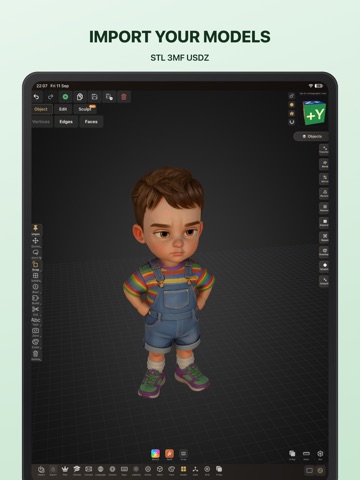
Forma3D answers the third question: "I already have a model — now make it print." It's the only one here that edits STL/3MF meshes directly — move vertices, extrude faces, boolean parts together, bridge holes — plus print-specific tooling: splitting oversized models, auto print profiles in exported 3MF, multi-color face painting for AMS, and Object Capture scanning.
Choose it for: fixing broken STLs, remixing downloaded models, splitting big prints, adding threads/bolts, scanning small objects, and multi-color print prep — all without touching a computer.
Where it loses: it's not for creating from imagination — no sculpting brushes, no parametric sketches. Think workshop, not canvas. It's also the youngest of the three, with a smaller community and no desktop version.
Different enough to combine
Real-world makers often use two:
- Sculpt + prep: Nomad for the form → Forma3D to hollow, split and export 3MF for the printer.
- CAD base + organic detail: Shapr3D for the dimensioned body → OBJ into Nomad for grips/details.
- Scan + fix: scan an object (Polycam or Forma3D's Object Capture) → repair and scale in Forma3D.
There's no single winner — buy for your discipline. Sculpting → Nomad ($20, best value in 3D software). Precision CAD → Shapr3D if the subscription fits. Working with print files → Forma3D. Many serious iPad makers eventually own two of the three.
Also see: best 3D modeling apps for iPad and the best STL editors across all platforms.
FAQ
Is Nomad Sculpt or Shapr3D better for beginners?
Nomad Sculpt — sculpting feels like digital clay and rewards experimentation immediately. Shapr3D is easy for CAD software but still expects you to think in sketches, constraints and dimensions.
Can Nomad Sculpt do precise, dimensioned parts?
Not really — Nomad works in freeform meshes without parametric dimensions. For parts that must measure exactly (brackets, enclosures, threads) you want Shapr3D or Forma3D's mesh editing with measured transforms.
Which app is best for editing downloaded STL files?
Forma3D — it's the only one of the three with direct vertex/edge/face editing of imported STL meshes, plus repair, splitting and printer-ready 3MF export.
Do Nomad, Shapr3D and Forma3D work together?
Yes, via STL/OBJ export. A common pipeline: sculpt in Nomad → decimate → import into Forma3D for cleanup, splitting and 3MF export; or model the base in Shapr3D and sculpt details in Nomad.
Keep reading