The 12 Best 3D Modeling Apps for iPad in 2026, Ranked | TOP 3D MODELER
The App Store is full of '3D modeling' apps that are mostly ad farms. These twelve are the real ones — we installed, modeled and exported with all of them.
How we ranked them
Three things matter more than feature lists: what discipline the app covers (sculpting vs CAD vs mesh editing are different jobs), how pricing actually works, and how well it survives real projects — importing, editing and exporting without destroying your file. Every app below was installed and used on an iPad Pro and a base iPad.
| App | Discipline | Price | App Store rating |
|---|---|---|---|
| Nomad Sculpt | Sculpting | $19.99 once | 4.8 |
| Shapr3D | CAD | Free / ~$299/yr Pro | 4.7 |
| Forma3D | Mesh editing / print prep | Free / sub or $99.99 lifetime | 5.0 |
| ZBrush for iPad | Sculpting (pro) | Free tier / $89.99/yr | 4.1 |
| uMake | CAD / sketching | Free / sub | 4.2 |
| Valence 3D | Poly modeling | $19.99 | 4.2 |
| Onshape | Parametric CAD | Free | 3.5 |
| SketchUp | Architectural CAD | Free view / sub | 4.5 |
| Putty 3D | Sculpting (casual) | $4.99 | 4.1 |
| Prisma3D | Modeling + animation | Free / sub | 3.4 |
| CozyBlanket Pro | Retopo / UV / bake | One-time | New |
| Polycam | 3D scanning | Free / sub | 4.6 |
1. Nomad Sculpt — the iPad 3D app, period

If you only install one app from this list, it's Nomad. At $19.99 one-time it delivers a sculpting suite that embarrasses subscription tools ten times its price: voxel remeshing, dynamic topology, multiresolution, layers, PBR vertex painting, decimation, UV unwrap and proper STL/OBJ/glTF export.
The UI is genuinely touch-first — radial menus, Pencil pressure that behaves like a real brush, and it survives multi-million-polygon meshes on M-series iPads. For characters, miniatures, organic forms and anything you'd sculpt in clay, nothing else on iPad comes close at this price.
Watch out for: it's a sculpting app, not CAD — no dimensions, no parametrics. Hard-surface work is possible (trim/lathe tools) but not its strength.
2. Shapr3D — the CAD standard
Shapr3D is what "iPad CAD" means in 2026: Siemens Parasolid under the hood, a Pencil-first direct-modeling UI, and a free tier that's actually useful (limited to 2 projects). Sketch a profile, pull it into a solid, fillet it, export STEP — for functional and engineering parts it's the smoothest CAD experience on any tablet.
The catch is pricing: serious use means Pro at roughly $299/year, and the free tier caps you at two projects and low-res exports. Worth it for professionals; hobbyists doing print-prep are better served by cheaper tools.
3. Forma3D — the 3D-print workflow app
Forma3D is a newer entry and occupies a niche nothing else on iPad covers well: real mesh editing built for 3D printing. It imports STL, 3MF and USDZ and gives you actual Edit Mode tools — vertices, edges, faces, extrude, booleans, bridge faces — plus print-oriented extras: model splitting, procedural bolts, image-to-3D, Object Capture scanning to USDZ, and per-face painting that exports multi-color 3MF for Bambu/Creality AMS workflows.
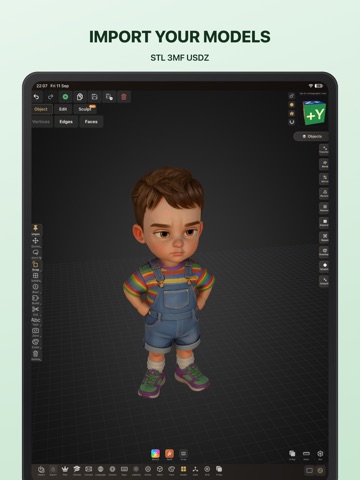
Pricing is fair for the niche: free download with viewing, then $6.99/mo, $49.99/yr or a $99.99 lifetime unlock with a 3-day trial. Everything runs on-device — no cloud processing, works offline.
Where it fits: repairing a broken STL, splitting a model for your build plate, painting a multi-color print — without opening a laptop. It's not a sculpting app or parametric CAD; if you want those, pick Nomad or Shapr3D instead.
4. ZBrush for iPad — pro sculpting, subscription tax

Real ZBrush on iPad — same brushes, DynaMesh, ZRemesher, GoZ round-tripping with desktop files. Maxon rates it for ~90M-poly meshes on newer hardware, and the free tier (28 popular brushes, limited features) is a generous demo.
Two honest caveats: it's a different product from desktop ZBrush with a reduced (if large) feature set, and the full version costs $9.99/mo or $89.99/yr — or comes bundled with a $399/yr desktop subscription. For pros already in the ZBrush pipeline it's a no-brainer; for hobbyists, Nomad covers 90% of it for a $20 bill.
5. uMake — CAD for the sketching crowd

uMake sits between sketching and CAD: NURBS curves, surfaces and solid tools wrapped in an interface that feels more like a drawing app than engineering software. Good for product/industrial design concepts and quick forms; less good for precision engineering or print-ready dimensioning. Free tier, subscription for the full toolset (~$10/mo range).
6. Valence 3D — underrated poly modeler
Valence 3D is a genuine polygon/SubD modeler for iPad — box-modeling, edge loops, bevels — for $19.99 one-time. If you think in quads rather than clay or CAD sketches, this is your app. Small user base and slower updates are the honest cons, but the core is solid.
7–8. Onshape & SketchUp — the CAD veterans
Onshape is full parametric CAD with a real free tier (public documents) — the mobile app is a thin but functional client of a very capable cloud platform. The 3.5★ App Store rating is fair: it wants a connection and the UI is dense on smaller iPads.
SketchUp for iPad is excellent for architecture/interiors with proper inferencing, but modeling requires a paid plan (viewing is free). If you're already in the SketchUp ecosystem it's great; newcomers should compare it against Shapr3D first.
9–10. Putty 3D & Prisma3D — cheap and cheerful

Putty 3D ($4.99) is a simple, likable sculpt app — limited tools, old codebase, but it works and costs less than a coffee. Prisma3D (free) combines modeling with basic keyframe animation and has a massive Android user base; rough around the edges but surprisingly capable for $0.
11. CozyBlanket Pro — for the pipeline nerds
Not a modeler — a retopology/UV/baking toolkit that turns high-poly sculpts into game-ready assets, from the team behind Uniform (Sparseal). One-time perpetual license, requires Apple Pencil and iPadOS 18.6+. If those words mean nothing to you, you don't need it; if they do, it's the only iPad app doing this properly.
12. Polycam — the scanning specialist

Strictly speaking Polycam is a scanner, not a modeler — but LiDAR + photogrammetry capture is the other half of many 3D workflows. Best-in-class mobile scanning; editing happens elsewhere (see #3 or Nomad).
Also-rans: Autodesk Fusion's iPad app is a viewer/companion, not a modeler. Tinkercad has no native app but runs fine in Safari. Forger was discontinued after its team moved to ZBrush for iPad.
Sculpting → Nomad Sculpt. CAD → Shapr3D. Print-prep and mesh repair → Forma3D. Buy in that order of need, and only reach for ZBrush or CozyBlanket if your pipeline genuinely calls for them.
New to all this? Start with our beginner's guide to 3D modeling on iPad, or check which iPad you actually need for these apps.
FAQ
What is the best 3D modeling app for iPad overall?
It depends on the discipline: Nomad Sculpt for sculpting, Shapr3D for CAD, Forma3D for mesh editing and 3D-print prep. There is no single app that does all three well.
Is there a free 3D modeling app for iPad?
Yes — Shapr3D and ZBrush both have genuinely usable free tiers, Forma3D's download is free with viewing included, and Tinkercad runs free in Safari. Prisma3D is a free option for modeling plus basic animation.
Can you use Blender on iPad?
Not natively — there's no official Blender iPad app. iPad sculpting apps (Nomad, ZBrush) or mesh editors cover most Blender modeling tasks; remote-desktop streaming is the workaround for the real thing.
Which iPad app is best for 3D printing specifically?
Forma3D — it's built around the print workflow: STL/3MF import and export, mesh repair, splitting, and printer-ready 3MF output with Bambu/Creality profiles. Shapr3D is the pick when you need parametric CAD instead.
Do these apps work offline?
Mostly yes — Nomad, Forma3D, ZBrush and Shapr3D all model offline. Onshape is the exception: it's cloud-native and wants a connection for full functionality.
Keep reading