Nomad Sculpt Review: The $20 App That Runs iPad 3D | TOP 3D MODELER
There's a reason every 'best iPad 3D app' list puts Nomad first — we just wanted to check if it still deserves it after years on top. Short answer: yes, with real caveats.
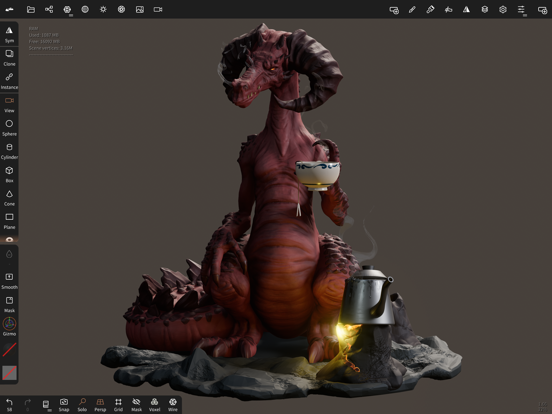
What it is
Nomad Sculpt is a digital sculpting app from solo developer Stéphane Ginier (Hexanomad): clay-style brushes, dynamic topology, voxel remeshing, multiresolution, layers, vertex painting with PBR materials, decimation, and export to STL/OBJ/glTF/PLY. Available on iPad, Android, and desktop. One price, no subscription, no account.
What impressed us
- The sculpting feel. With Pencil Pro, brush response is immediate and pressure behaves — this is the core job and it's nailed.
- Voxel remesh + dynatopo. You never fight topology: remesh when forms collapse, add detail only under the brush. Beginners get results on day one; pros sketch faster than in desktop tools.
- Layers for everything. Sculpt and paint changes both record into layers — iterative work without fear.
- Real export. STL straight to a slicer, OBJ/glTF with vertex color into pipelines. Our test bust printed fine after a decimate pass.
- $19.99, once. Still the best price-to-capability ratio in 3D software, period.
Where it hits limits
- No precision. It's clay, not CAD — no parametrics, no exact dimensions. Brackets and mechanical parts want Shapr3D or similar.
- RAM ceiling. Dense scenes with layers get heavy; 12–16GB iPads are noticeably more comfortable for serious work than the 4–6GB entry models.
- Light-touch retopo/UV. Automatic unwrap exists but pipelines needing clean game-ready topology still go through CozyBlanket Pro or desktop.
- Solo dev pace. One person ships this — updates are impressively steady, but feature requests queue accordingly.
Who it's for
Miniature and figure makers, concept sculptors, jewelry designers, students, and honestly anyone who wants to make a thing without a CAD degree. Also the best "is 3D for me?" $20 experiment in existence.
Who should skip it
Precision engineers (CAD apps instead), ZBrush-pipeline professionals who need the exact toolchain (get ZBrush for iPad), and people wanting to edit existing STL files rather than sculpt — that's mesh-editor territory.
4.8/5 — buy it. The App Store rating isn't a fluke: Nomad is the app that made iPad a legitimate 3D platform. The only real question is whether your work is sculpting at all — if it is, there's no better $20 in software.
FAQ
Is Nomad Sculpt worth $19.99?
Yes — it's arguably the best value in all of 3D software. One payment buys a sculpting suite comparable to tools costing $400/year, with free updates so far.
Can Nomad Sculpt export for 3D printing?
Yes — direct STL export plus decimation tools to get high-poly sculpts down to printable size. For hollow/split/paint print prep, pair it with a mesh tool like Forma3D or a slicer.
Nomad Sculpt vs ZBrush for iPad — which is better?
ZBrush has more power and the industry pipeline; Nomad has a far better price ($20 once vs $89.99/yr), gentler learning curve, and covers what most iPad users actually need.
Keep reading